
4 Costly Network Connectivity Issues That Hurt Your Business (+ Quick Fixes)
Are network problems bringing your business to a standstill? You are not alone. Across offices of every size, productivity quietly slips away because of unreliable connectivity.
IT teams regularly face issues like slow speeds, weak Wi Fi coverage, and aging cabling. For business owners, these problems quickly become a source of frustration. Many worry that fixing them will require expensive specialists or disruptive downtime.
The reality is that most network issues are not as complex as they seem. Sluggish performance is often caused by poor connection quality or network congestion, and these problems tend to build gradually. In many cases, businesses only recognize how critical their office network is after something finally stops working.
In this article, we will break down four common office network problems that can become costly if left unresolved. You will also find practical ways to address them efficiently. A fast, secure, and reliable network is not just an IT concern. It is the foundation that keeps modern offices running smoothly.
Inconsistent Wireless Coverage Across the Office
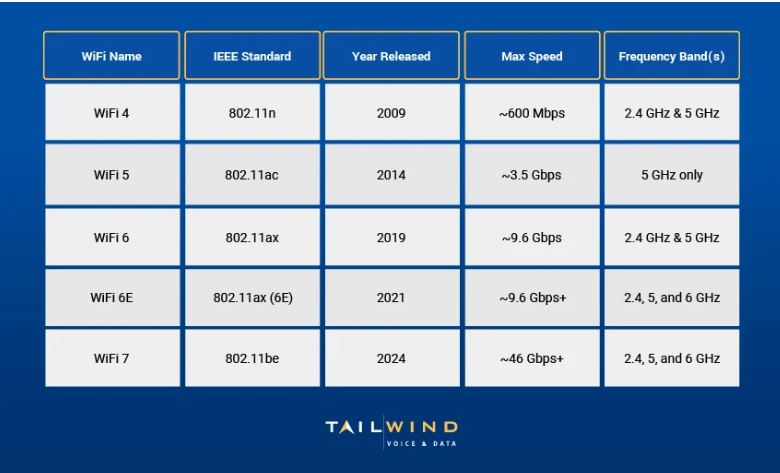
Image Source: Tailwind
You walk into certain areas of your office and watch your wireless signal drop to zero. This isn’t just annoying—it costs your company real money. These wireless dead zones are more than minor hassles. They create business problems that affect your bottom line directly.
Smooth wireless connectivity has become vital to run daily business operations, especially with distributed networks and multiple device types. Poor coverage ripples throughout your organization. It affects everything from simple communication to complex team tasks, which is why many companies now treat business WiFI as critical infrastructure rather than a basic utility.
Research shows slow WiFi costs employees one week per year in lost productivity—that’s 40 hours per employee annually. On top of that, 39% of employees say their home internet runs faster than their office WiFi. Each worker loses about 54 minutes every week due to connection problems. These numbers mean wasted salary dollars and missed chances.
You need to know what causes these wireless problems to fix them. Several things usually lead to weak wireless coverage:
- Physical obstructions: Concrete walls, doors, metal fixtures, furniture, and other dense materials can weaken WiFi signals by a lot. Old buildings with thick walls create special challenges. Signal strength drops fast when passing through multiple barriers.
- Improper access point placement: Many businesses put access points (APs) in utility closets, behind walls, or in corners without knowing better. This limits range and creates dead zones. Router placement matters a lot—hiding it in a corner and using only access points to spread the signal gives poor performance.
- Outdated equipment: A router without dual-band or Wi-Fi 6 support might not handle what a modern office needs. New standards give better speed, capacity, and efficiency. Old equipment doesn’t deal very well with today’s bandwidth needs.
- Signal interference: In shared offices or multi-tenant buildings, nearby routers might use the same WiFi channels. This causes interference and drops. Cordless phones, Bluetooth gadgets, microwaves, and security cameras can mess with wireless signals too.
- Network congestion: Today’s offices use more than laptops and phones. They have security cameras, smart TVs, printers, tablets, and personal devices all on one network. This overloads routers and slows everyone down.
WiFi can trick you. Full bars don’t always mean good connection. You might still get buffering, failed uploads, or dropped calls. Signal strength is just one piece—signal quality and available bandwidth matter just as much.
Security Gaps Created by Guest and BYOD Devices
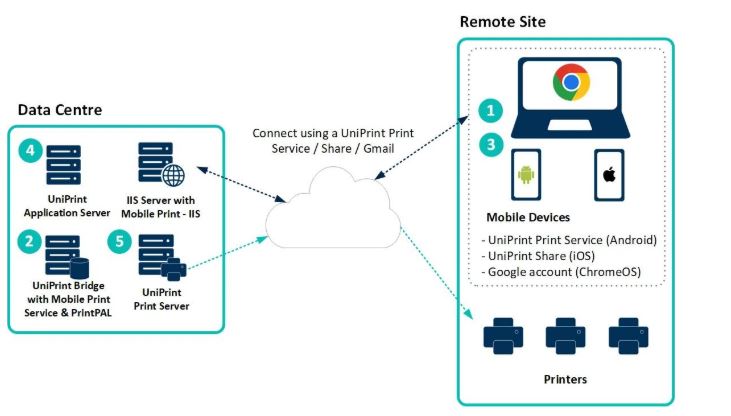
Image Source: UniPrint.net
Personal devices connecting to your network without proper security create a perfect storm for potential breaches. Research shows that 70% of businesses now allow bring-your-own-device (BYOD) policies. About 87% of employees access work apps from their personal smartphones. These convenient connections create major security weak spots that organizations often miss.
Personal and professional devices have become increasingly intertwined. Remote and hybrid work models are now standard practice in the business world, which multiplies security challenges. Your corporate network faces risks every time personal devices connect to it. These devices can become easy targets for cybercriminals looking to break into your systems.
These security risks are real and immediate. A single compromised device can start a chain reaction of problems – from unauthorized access to data leaks or full system breaches. Research reveals that 67.7% of businesses suffer major data losses. Personal devices without proper security make these odds even worse.
The root cause lies in competing priorities. Personal devices lack the strict security measures you’d find on company equipment. Security experts point out these main BYOD risks:
- Lost or stolen devices – Personal devices can go missing easily and expose company data to unauthorized users
- Malware and unauthorized applications – Staff members might download harmful software without knowing it
- Unsecured networks – Public Wi-Fi connections leave employees vulnerable to hackers
- Data leakage – Staff might share sensitive data through unsafe personal email or cloud storage
- Unclear security policies – Many employees don’t understand the risks and ignore security rules on their devices
Guest Wi-Fi networks add another layer of complexity. Offering internet access seems like good hospitality, but unsecured guest networks often hide serious security flaws in company systems. These networks expose businesses to data theft, malware spread, and traffic manipulation through man-in-the-middle attacks.
A strong BYOD policy helps protect against data loss, unauthorized access, and compliance issues by spelling out:
- Allowed device types
- Required security settings (antivirus, encryption, passwords)
- Access limits and controls
- Rules for company data storage and syncing
- Steps to take for lost or stolen devices
Network Slowdowns During Video Calls and Cloud App Usage
Image Source: NordLayer
Modern applications just need more from your network than ever before. Video conferencing, cloud-based software, and data-intensive operations use up most important bandwidth. Your aging network infrastructure struggles to keep up. Your entire business feels the effects when these critical applications slow down.
Today’s workplaces heavily depend on bandwidth-intensive applications. A single high-resolution video conference needs up to 6 Mbps. Newer telepresence technology in conference rooms might need as much as 20 Mbps. Businesses adopt cloud-based tools more and more for everything from document cooperation to customer relationship management. These collective needs can overwhelm unprepared networks.
The real-life consequences hit immediately and cost you dearly. Performance issues during peak hours show your network lacks capacity for current operations and future development. Your infrastructure becomes a serious bottleneck when video conferences freeze, file transfers crawl, or applications timeout during busy periods.
The damage goes beyond internal operations. Customers expect uninterrupted interactions in today’s digital-first world—whether they’re purchasing online, using self-service portals, or interacting with in-store technology. A sluggish, unreliable network affects how well your company serves customers. This leads to delayed responses, poor service, and lost business opportunities.
Several factors typically cause these performance issues:
- Insufficient bandwidth allocation – Businesses often underestimate their true bandwidth needs and fail to account for multiple simultaneous activities
- Traffic prioritization problems – Critical applications compete with less important traffic without proper QoS (Quality of Service) implementation
- Legacy infrastructure limitations – Older network equipment can’t handle modern application needs
- Microbursts and traffic spikes – Short-duration traffic spikes cause temporary congestion that standard monitoring might miss
- Hidden bandwidth consumers – Employee personal devices that stream music or videos can quietly use up significant network resources
Networks That Break When the Business Scales
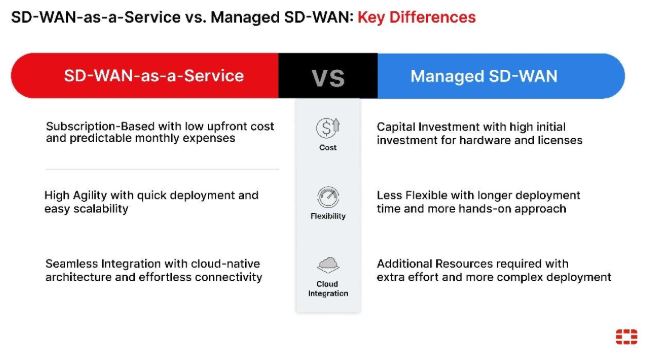
Image Source: Fortinet
Your network infrastructure might work perfectly now but could fail to meet your needs in six months. Network failures due to growth don’t come with warning signs. They sneak up on you until your infrastructure becomes a serious business liability.
Your network infrastructure faces new demands as your business grows. Things that worked smoothly start to break down when you add employees, locations, or cloud applications. Many organizations realize these problems only after they hurt operations, customers, and profits.
The first signs of network scaling problems are subtle. Performance varies throughout the day. The network runs at decent speeds in the morning but slows to a crawl by mid-afternoon during peak usage. Teams struggle with frozen video calls and cloud application timeouts. Productivity drops just when you need it most. These aren’t minor issues – they point to fundamental capacity problems that directly hurt your revenue.
The cost of an outdated network infrastructure goes beyond technology. When systems can’t handle your workload, your employees face:
- Long waiting times to access applications and data
- Lower productivity in every department
- Simple tasks that should take minutes now take hours
A network that scales well helps your business grab new opportunities, use new technologies, and meet customer needs without disruption. It also saves money by matching capacity to demand, avoiding waste and shortages.
Keeping Your Network Ready for What Comes Next
Network connectivity problems rarely stay isolated. What starts as a weak signal or a slow video call can quickly grow into lost productivity, security exposure, and stalled growth. As this article shows, many of the most expensive network issues develop quietly over time, only becoming obvious once they begin to affect daily operations and customer experience.
The encouraging part is that these challenges are both visible and fixable. Strong wireless coverage, clear separation of guest and employee access, smarter traffic management, and infrastructure built to grow with the business all work together to create a stable foundation. When these elements are in place, teams collaborate more easily, customers experience fewer disruptions, and IT teams spend less time reacting to avoidable problems.
A reliable network supports every part of modern work. It keeps people productive, protects sensitive data, and allows the business to expand without friction. Treating connectivity as a strategic priority rather than a background utility helps prevent costly surprises and keeps your organization prepared for what comes next.